League Policies
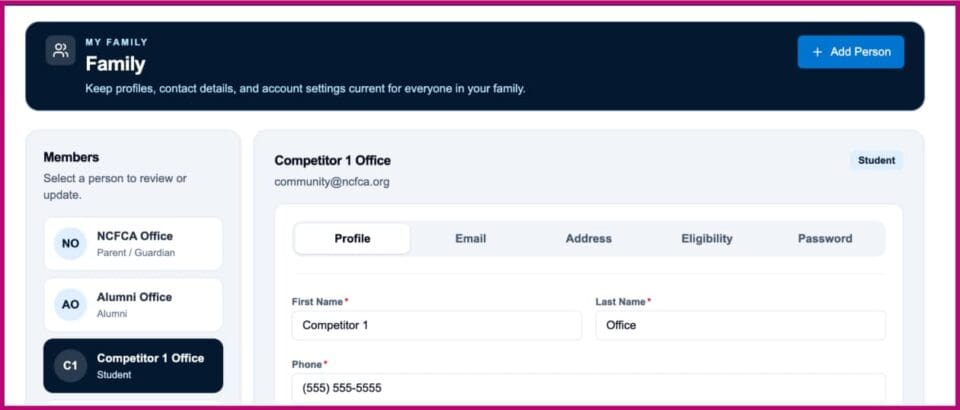
Update Each Family Member
- Select Family on the left side menu in MyPlace.NCFCA.org.
- Choose a person from the left side menu or choose “Add Person.”
- For each person in the family, move through the tabs and save updates for each step.

- Note: The tabs will only display for existing profiles. If you add a new person, please refresh to see the tabs.
- Again, be sure to click to UPDATE on EVERY TAB!
Updating Profile Tabs: Detailed Instructions
TAB 1) Profile
- Update name, phone number, person type, gender and age.
- IMPORTANT Toggles for Parents and Alumni
-
- Parents or Guardians must toggle the Parent/Guardian option to successfully register for tournaments. Be sure the circle in the toggle shows on the right and the background is dark blue.
- Graduated Competitors need to be changed to Adult and have the Alumni option toggled to successfully register as judges. This action can only be done by an adult on the account.
TAB 2) Email
- Update email address and choose email preferences.
- The email address must be unique and verifiable for every person.
- If a “server error” message appears regarding an email address, please check that the email account is not already in use for a different family member. Otherwise, contact the NCFCA office at gro.ACFCN@eciffO for help to resolve the issue.
TAB 3) Address
- List your address. This is used occasionally to send special mailings.
TAB 4) Safety (for Adults)
- Review and complete the toggles.
TAB 4) Eligibility (for Students)
- Please enter the anticipated graduation date, education model, eligibility status (Junior or Eligible Competitor).
- Please see our Competitor Eligibility policy to determine whether a student is eligible for qualifying competition.
- Toggle Eligible Competitor age affirmation if applicable.
TAB 5) Password
- You have the option to update the password.
SAVE UPDATES
- Check that you have saved your updates on each tab.