League Policies
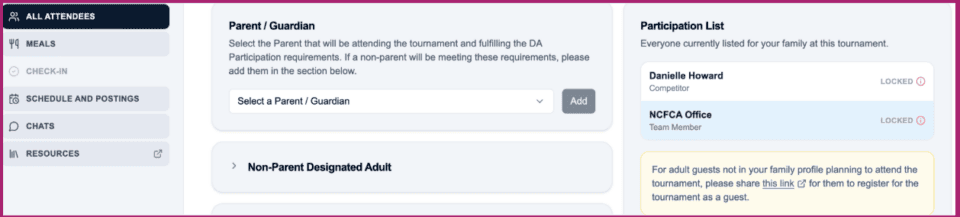
Click the All Attendees option from the left-side menu of your chosen tournament to complete the registration process for anyone who will not be a competitor.
Identify the Responsible Adult(s)
Each family must specify at least one Parent/Guardian or Designated Adult who will participate in the tournament on behalf of the family in accordance with our Parent or Designated Adult Participation Requirements.
- If parent(s) will be attending, please select their names from the Parent/Guardian Dropdown.
- The toggle in Profile-Tab 1 for Parent/Guardian must be turned on for the parent(s) name to appear.
- Click Add Family Participant to see the name appear in the participant list to the right.
- If a parent will NOT be attending, please complete the Non-Parent Designated Adult section.
- The Designated Adult must have an NCFCA account with a unique email address for our system to find.
- When the correct person is identified, click Add Family Participant to see the name appear in the participant list to the right.

Add Other Family Attending
Please identify any additional non-competing family members on your family account who will be at the tournament with you so that we can prepare name tags in advance for them and ensure completion of safety requirements for adults. Adults who are not in your family profile can register as a guest on Visit a Tournament | NCFCA, or by registering as a community judge from their own NCFCA account.
Attending Minors
Add any minors attending with your family. If you are bringing a minor who is not your child or for whom you are not the parent/legal guardian, you must bring an NCFCA Release Waiver signed by the parent/legal guardian and be in possession of a signed medical release form.
- If parent(s) will be attending, please select their names from the Parent/Guardian Dropdown.